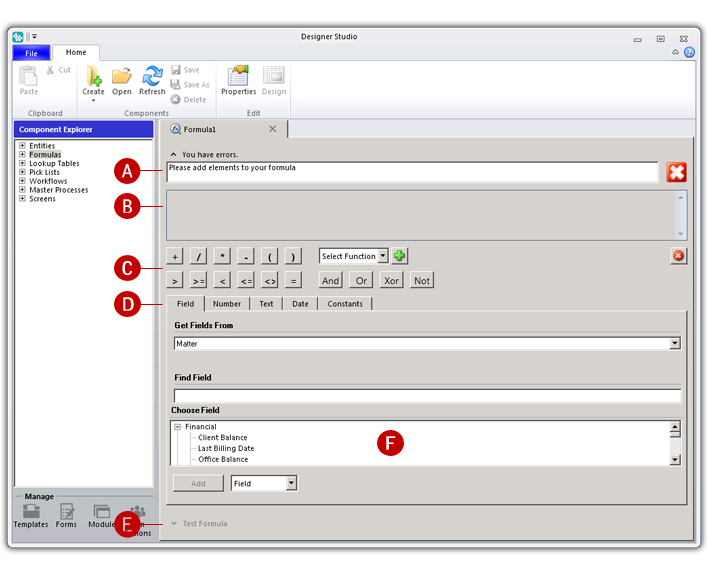
Formula Designer is a tabbed pane that allows you to construct and manage the formulas contained in your module. When you open a formula you are opening an instance of the Formula Designer and you will automatically see a contextual tab in the ribbon that shows options specifically related to formulas.
A key feature of Formula Designer is the ability to incorporate fields in formulas. This allows you to use any information that is stored in the ALB database. To achieve this, Formula Designer contains a field picker. From here you can quickly and efficiently find fields and add them to your formula.
Formula Designer also includes a validation mechanism. Based on a formula's properties, it instantly knows what the expected output should be and it also knows how valid formulas should be constructed. As you build a formula, it automatically validates as you go and indicates if there are any errors. It is also possible to test formulas against live matters from directly within Formula Designer. This is very useful, as it allows you to make sure your formula is working as intended.
Fig. Formula Designer
A. Validation box B. Formula pane C. Operator buttons D. Operand tabs E. Test pane F. Field picker
Formula Designer is only displayed when you open a formula.
The validation box is expandable and shows whether a formula is valid or not.
The formula pane displays the formula currently being designed.
Operator buttons; mathematical, comparison, logical, and concatenation.
Brackets allow you to set the operator precedence.
Operand tabs include access to fields, constant values (number, text, and date), and pre-defined constants.
The field picker (Field tab) provides access to database fields.
The test pane is only available once a valid formula has been constructed.