|
|
|
|
Field Designer is a tabbed pane that allows you to manage the fields contained in your module. When you open an entity you are opening an instance of the Field Designer and you will automatically see a contextual tab in the ribbon that shows options specifically related to fields.
The standard entities are listed in Module Explorer under Fields. When you open any of these you are presented with a data grid in Field Designer, showing the user-defined fields that are stored in the database table for that entity.
As well as the data grid, Field Designer contains two collapsible panes—Filters and Additional Information. These provide access to the various filters that can be applied to the list and to the properties that are associated with each field. These have been made collapsible so that when they are not required they can be hidden from view, allowing the maximum amount of space to be allocated to the list of fields.
Fig. Field Designer
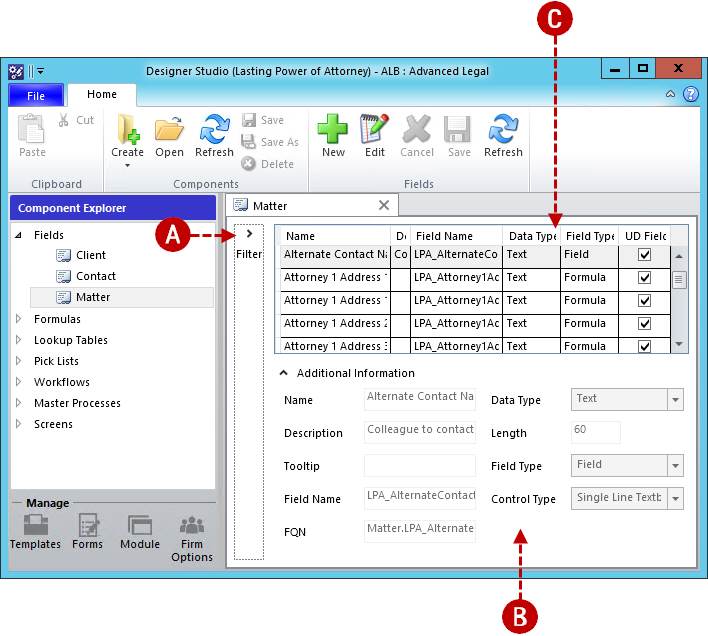
A. Search filters B. Field properties C. Data grid
Field Designer is only displayed when you open an entity.
The columns in the data grid can be sorted by clicking the column headers.
The columns in the data grid can be moved by dragging the column headers.
Changes to the column sort order are only retained for the current session.
Changes to the column positions are only retained for the current session.
System fields can be displayed by setting Is User Defined? to No.
The Filters and Additional Information panes can be toggled using the arrow buttons.
|
© Advanced, Oct 2016 • Terms of use • Contact us |
|