|
|
|
|
|
|
(This section relates to users with an Enterprise Licence only)
The life cycle of a process involves a number of different states. These are described in the following diagram:
Process diagram
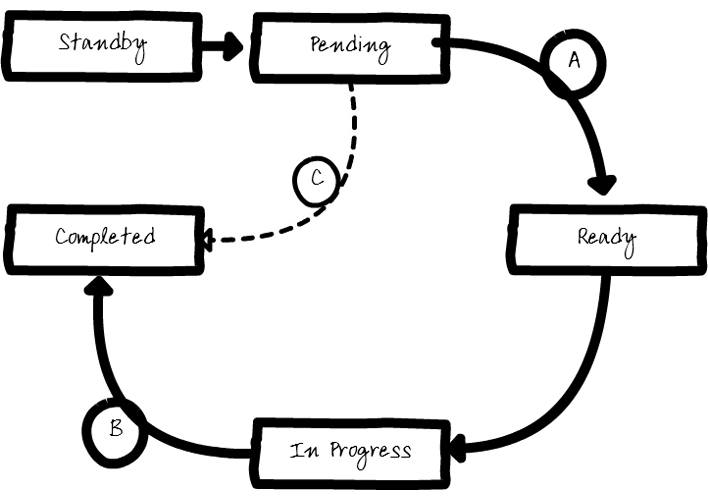
A process starts in a Standby state and must be activated before it can be used. Once activated, a process moves to a Pending state. It transitions to Ready once all pre-conditions have been met, In Progress (either manually by you choosing to run a process or automatically when set to auto-run), and then Completed.
Between the Pending and Ready states there are optional pre-conditions as shown in (A). These conditions determine whether the process can transition to Ready. If a process has no pre-conditions, then it can transition directly to Ready. The process transitions (B) directly to Completed. Also, a process will go straight from Pending to Completed if an override condition is met (C) before its pre-conditions.
The process states above outline the states that a process can be in. The table below explains how these states are reached.
| Process States | |
State |
Description |
| Standby | The default state of a process. Before a process can be started it must be activated, i.e. switched on. |
| Pending | When a process is started it is initially set to this state. At this point in time all pre-conditions will have been initialised too. Pre-conditions record audit information about when they started and were met. |
| Waiting | When a process is waiting for its immediate parent process to start, it is set to this state. |
| Ready | When the pre-conditions for a process have been met, that process
moves to the Ready state. Processes may be manual or automated,
so for manual processes you will click on an icon to run the process.
Automated processes will transition from Ready to In Progress
with no user input.
To achieve this, the Auto-run flag must be set against a process; this indicates that the process should transition from Pending, through Ready, to In Progress automatically once all pre-conditions have been satisfied. |
| In Progress | Any process that has been manually started by you or automatically started by the system is marked as In Progress. Some processes will be completely automated—in this case a workflow will be assigned to the process. When this is the case, the process will be moved from In Progress to Complete when the workflow has finished. |
| Completed | This state is the most complex and is dependent on several
factors. The options fall into the following categories:
A process with no sub-processes If a process is created and it has no sub-processes then it won't transition to Completed, other than by you specifically choosing to complete the process from the user interface. However, if the process includes a workflow, when the workflow completes the process state will automatically transition to Completed. A process with sub-processes If you have (say) two sub-processes attached to a process, the process's lifetime will, by default, be dependent on the sub-processes. When the last sub-process completes the process will automatically transition to Completed. You can use logical operators to combine Completed sub-processes to the Completed value of the process. You might have an optional process—so you could have a process where sub-processes A and B are mandatory, but sub-process C is optional. You can then use override conditions to deal with this. |
|
© Advanced, Oct 2018 • Terms of use • Contact us |
|