Using a Document Header
Note This
section deals with the Doc_P
process. For templates using the MT02
process, please refer to the
MT02 Process.
Once you have created
your document header you need to link it to the relevant document templates.
Alternatively, if you have multiple document headers you can code the
document template so that it displays a list of available document headers
for you to select at the point of merging.
To link a document template to a specific document
header:
- Open the document template from the Document Template Management window.
- Using the Field
Code Selector, expand the Insert
Command Codes folder.
- Select HD
- Single Header.
- In the formatting options, select the relevant
document header.
- Drag the HD
- Single Header code to the top of the document template.
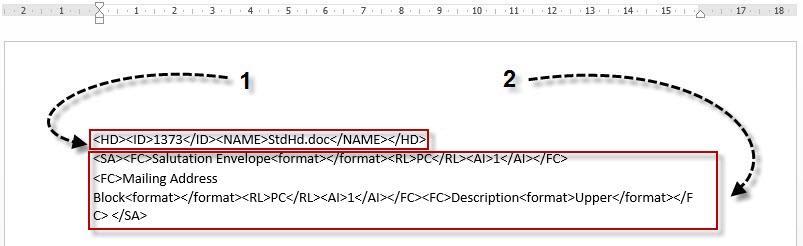
- The <HD></HD>
coding (1) displays in
the document template with the document header's id number and name,
similar to the example below.
- From the Field
Code Selector, select the SA
- Address command code and drag it on to the document. The
correct position will be dictated by the code in the document header.
- Insert the relevant field codes between the
start and end SA coding (2).
- If necessary, drag the Your
Reference code to the document and insert the relevant coding.
The document header will dictate the position.
- Close the document template and click Yes to save your changes.
To allow the user to select the header document:
- Open the document template from the Document Template Management window.
- Using the Field
Code Selector, expand the Insert
Command Codes folder.
- Select HQ-
Multiple Headers.
- Drag the HQ-
Multiple Headers code to the top of the document template.
- The <HQ></HQ>
coding displays in the document template.
- If necessary, drag the Address
and Your Reference codes to
the document and insert the relevant coding. The selected document
header will dictate their positions.
- Close the Document template and click Yes to save your changes.
When the document template is selected to merge, the Missing Data Assistant
displays the list of document headers available for you to select and
then click Continue.
Related Topics

