|
|
|
|
|
|
The following will need to be completed for a Family claim:
| Field | Description |
| Complete Under Contract | Select as appropriate |
| End Point Complete Date | Enter date the matter completed.
|
| Outcome | Use the magnifying glass to select the correct outcome code. |
| Stage Reached | Use the magnifying glass to select the correct stage reached,
if required.
|
| Nil Effect Matter | Select if applicable, this will then create a blank entry line on the CMRF, but accounts will not be able to post the zero claim. This is for use when reporting completed claims outside the 6 month limit. |
| VAT Rate | Will default to standard VAT rate. |
| Procurement Area | Select the desired Procurement Area, based on the specific location of the work you are undertaking. From 15th November 2010, all cases must be reported with this case location information. |
| Access Point | Select the appropriate Access Point. The Access Point lookup is automatically filtered based on the selected Procurement Area, i.e. it only displays those related to the Procurement Area already selected. |
| Schedule Reference (Outcome) | Completed automatically. |
| Transfer Date | Active when Procurement Area and Access Point set to transfer (30000) and is the date the matter is transferred from another law firm. |
| Postal Application Accepted? | Set to Yes or No to enable you to report if an application has been made remotely or by post. The monthly submission includes this in the upload file. |
| ECF Reference | Active when Procurement Area and Access Point set to ECF (20000), enter the code provided by the Legal Aid Agency when ECF has been agreed. |
| Exemption Criteria | Use the lookup to select the relevant Exemption Criteria. |
| Local Authority No | Not applicable to Family Private Law. |
| Value of Costs Damages Recovered | Where the statutory charge arises at Level 2 fees, enter the total value of costs or damages recovered by the client. |
| Case Stage Level | Use the magnifying glass to select the correct Case Stage Level. It is the case stage level that denotes the applicable fee level. For a matter that started pre 1st October 2007 you will need to use FPL01. |
| Relevant Case Information | Enter as applicable; this will appear on an EC1 claim if the case is exceptional. |
Where the matter type I is one of FAMA, FAMB, or FAMC, the available case stage level codes will only be FPL01 and FPL10 (as these matters are limited to payments at level 1 only). For all other matter type 1’s then all case stage level options will be available. For a full list of rates please refer to the LAA website.
Once all details have been completed on the Claim Tab, select Apply to save and go to the Reports Menu and select Claim Details.
This will give the following report
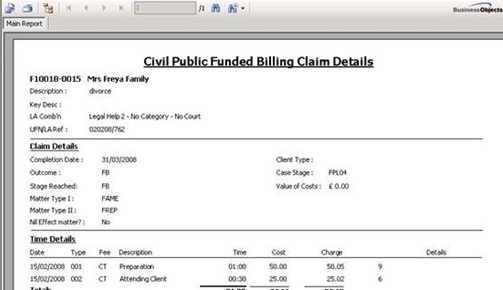
The Claim Detail Report can only be obtained prior to submitting a claim and shows the details of Stage Reached, Outcome, Matter Type I and II, completion date and a schedule of time to be included in the claim and any disbursements available for inclusion in the claim.
|
© Advanced, Aug 2020 • Terms of use • Contact us |
|