|
|
|
|
|
|
You can easily create documents at convenient points in ALB:
For documents relating to a matter, it is best to produce them at matter-level rather than client-level. The reason is that more information is available to the matter and so more can be merged into documents: client information can be picked up by the matter record, but matter information is not picked up by the client record.
Which document options appear on the Actions menu depend on the screen. On Matter Details and case module screens such as Conveyancing Details, you have all three options available on the Actions menu: Quick Letters, Produce Correspondence and Produce Form.
Top part of the Actions menu on Matter Details
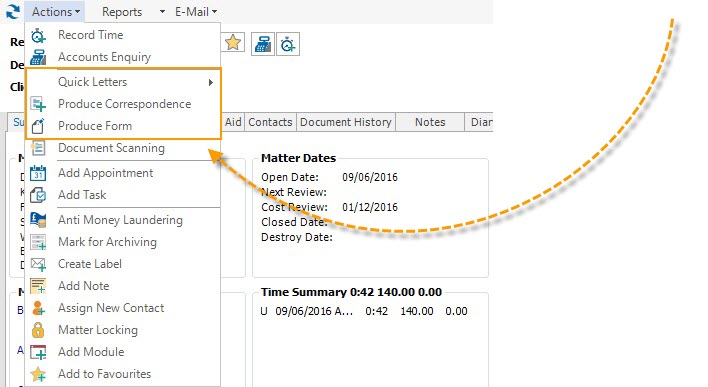
Quick Letter templates are listed as a sub-menu when you hover the mouse over Quick Letters on the Actions menu.
If you want to send a document to a particular contact, you can do this via the Contacts tab that appears on various ALB screens. Right-click the contact and select the type of document.
Right-click menu on Client Details - Contacts tab
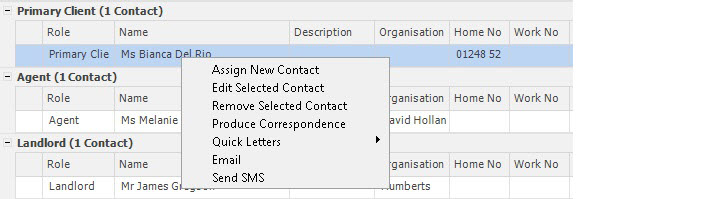
On the Contacts tab, you can also right-click a blank part of the screen to see the general document creation options that are available.
You can create documents as part of actioning an agenda step. See Documents and agendas.
You can create documents as part of actioning a workflow. See Using Starter Packs.
A document is saved with the record for which you initiated the document, on the Document History tab, in the folder you specify when saving the document.
Related topics
|
© Advanced, Aug 2020 • Terms of use • Contact us |
|