|
|
|
|
Screen Designer is a tabbed pane that allows you to manage the screens contained in your module. When you open a screen you are opening an instance of the Screen Designer and you will automatically see a contextual tab in the ribbon bar that shows options specifically related to screens.
Screen Designer is split into 3 panes—the toolbox (with Field Picker), the Layout pane, and the Properties pane. You add fields and controls to the Layout pane, where you arrange and configure them to build your user-defined screen.
All screen elements have associated properties. You may be happy with
the default settings or you may wish to edit them in order to change how
they look. In addition, some controls have mandatory properties which
must be set and some require specific information to be defined in order
to control their behaviour. You do this by configuring each setting in
the right-hand Properties pane.
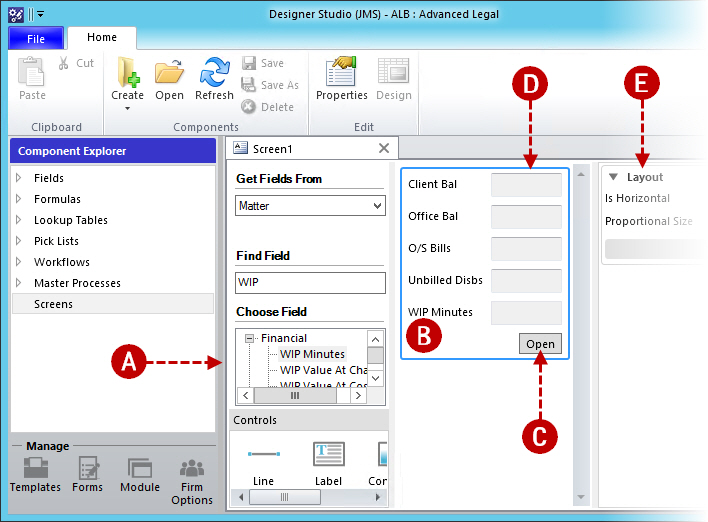
A. Toolbox B. Layout pane C. Control D. Field E. Properties pane
|
© Advanced, Apr 2022 • Terms of use • Contact us |
|