Parameters A-Z
For ease of use, the following list has been structured into an alphabet of parameters and descriptions. Wherever possible each entry contains the parameter name, the options, a description, and details of any linked parameters or modules. Use the letters below to jump to the desired section.
Go to: A B C D E F G H I J K L M N O P Q R S T U V W X Y Z
A
- Accounts Posting Editing. (Yes/No).
- Account Type. For example, Bills Delivered, Cash on VAT. Do not change without speaking to Advanced .
- Additional Completed Period Warning. (Yes/No) Gives a further warning when posting into a previously closed period.
- Allow access to Integration. (Yes/No) Enables the integration user to use the API which pushes data into the ALB
database by a third party which then displays in the Conveyancing Instructions dashboard.
- Allow access to Lawyer Checker. (Yes/No) Enables users with the appropriate permissions to run checks against other side solicitors.
- Allow archive with uncompleted tasks. (Yes/No) Defaults to Yes. If Yes, matters with Key Date or Limited diary entries that are not completed can still be archived. If set to No, these entries will need to be flagged as completed before the matter is allowed to be archived.
- Allow archive with unreconciled balances. (Yes/No) Defaults to Yes. If Yes, matters that have unreconciled entries can still be archived. If set to No, these entries will need to be reconciled before the matter is allowed to be archived.
- Allow Overdrawn Client Account. (Yes/No) Client postings may result in a negative client ledger balance.
- AML Allow Multiple Reporting Officer. (Yes/No).
- AML CallML Enabled. (Yes/No) System critical. Enables the CallML integration.
- AML Identity Check Expiry Years. Sets the period when ALB will display warning of expiry.
- AML Minimum Evidence Required. Number of items to confirm identity.
- AML Turned On. (Yes/No) System Critical. Enables the AML module.
- Attendance Notes Folder. Drop-down list to set the default folder for attendance notes to be saved to history.
- Auditing. (Yes/No) Enables auditing of amendments made to the database, via the Audit Viewer screen. Linked to View Auditing feature – needs to be selected for appropriate users (typically administrators).
- Auto Save Bank Clear Down Reports. (Yes/No) Defaults to Yes, so when you clear down the bank transactions, reports produced are saved to history automatically.
- Automatic Conflict Check. (Yes/No) Defaults to Yes. When a client, service or contact is added, a conflict check is performed automatically as you move away from certain fields on the wizard for adding a new client, service or contact, and at the end of the wizard when the record is saved. If set to No, conflict checking is only performed automatically at the end of the wizard for adding a new client, service or contact, when the record is saved. Users can perform a manual conflict check at interim points on certain fields as required.
- Automatic Versioning. (Yes/No) Defaults to No. Users choose whether or not to use versioning for documents on an individual basis. If set to Yes, the Use Versioning check box, on Document History and Edit Document dialog boxes, is selected by default for all documents created. Users can still choose to deselect Use Versioning on an individual basis.
- Azure AD Single Sign-on Parameters. There have been new settings added for Azure AD single sign-on.
The following parameters are available: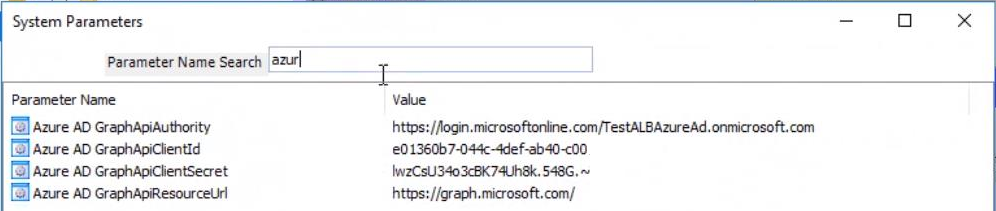
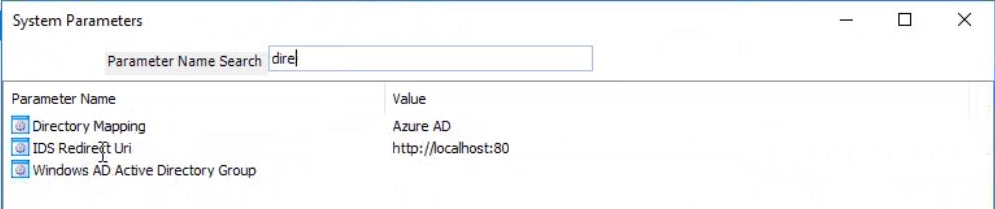
B
- Batch Posting Date. (Scottish system use only) Allows you to control whether the posting date can be changed from the batch date when making an accounts posting. By default, the parameter is set to Allow Posting Date Change. However, when the Country parameter is set to Scotland and Use Batches is set to Yes, the following options are enabled:
- Warn If Not Batch Effective Date. Specifies that a warning is displayed if an attempt is made to change the posting date from the batch date. Clicking OK allows you to proceed.
- Always Use Batch Effective Date. Specifies that the posting date cannot be changed from the batch date.
- bill Numbering Type. (Manual/Private only/LA Only/All Bills- Same Sequence/All Bills- Split Sequence) Decide between manual or system generated bill numbering. System generated numbers may be in use for Private bills only, Public Funding bills only or both bill types. System Generated bill numbers may follow on sequentially for all bills or have 2 different numbering sequences. Linked to parameters:
- Law Society Minimum Interest Value
- Mags Court – Rep Order – Proceedings
- No Court – Advocacy Assistance – Prison Law
- No Court – Rep Order – Proceedings
- bill Printing Default Template Type. (Crystal Reports or Word) Decide between Crystal Reports or Word as the default when producing bills. You can select the option when running the bill. The default setting is Crystal Reports type in keeping with prior functionality.
C
- Cashflow Turned On. (Yes/No) System Critical. Enables Cashflow reporting.
- CDS Counsel Fares. (Internal or External Disbursement Type) To account for Counsel Fares added in Public Funding Billing time recording. Linked to Public Funding Billing module.
- CDS Counsel Mileage. (Internal or External Disbursement Type) To account for Counsel Mileage added in Public Funding Billing time recording. Linked to Public Funding Billing module.
- CDS Crown Mileage. (Enter Financial Value, per mile, e.g. 0.45) Rate at which Crown Court matters' mileage is reclaimed. Linked to Public Funding Billing module.
- CDS Magistrates Mileage. (Enter Financial Value, per mile, e.g. 0.45) Rate at which Magistrates Court matters' mileage is reclaimed. Linked to Public Funding Billing module.
- CDS Partner Fares. (Internal or External Disbursement Type) To account for Partner Fares added in Public Funding Billing time recording. Linked to Public Funding Billing module.
- CDS Partner Mileage. (Internal or External Disbursement Type) To account for Partner Mileage added in Public Funding Billing time recording. Linked to Public Funding Billing module.
- CDS Solicitor Fares. (Internal or External Disbursement Type) To account for Solicitor Fares added in Public Funding Billing time recording. Linked to Public Funding Billing module.
- CDS Solicitor Mileage. (Internal or External Disbursement Type) To account for Solicitor Mileage added in Public Funding Billing time recording. Linked to Public Funding Billing module.
- Central Scan E-mail Server. (Server name) The Exchange server that receives email notifications about central scans. This is only needed if E-mail or Both is selected for Central Scan Notify Method. Linked to parameters:
- Central Scan Fee Earner
- Central Scan Notify Method
- Central Scan Pending Folder
- Central Scan Provider
- Central Scanning Enabled
- Central Scan Fee Earner. (Fee earner name) The fee earner that will receive notifications for scans where the client and matter can't be identified.
- Central Scan E-mail Server
- Central Scan Notify Method
- Central Scan Pending Folder
- Central Scan Provider
- Central Scanning Enabled
- Central Scan Notify Method. (Do not notify/E-mail/Desktop/Both) Whether and how PMS users will receive notifications about central scans that have been completed. Desktop refers to PMS email and associated pop-up message. Users can turn off their own personal notification.
- Central Scan E-mail Server
- Central Scan Fee Earner
- Central Scan Pending Folder
- Central Scan Provider
- Central Scanning Enabled
- Central Scan Pending Folder. (Folder path) The full path of the folder that holds central scans for which the matter and client could not be identified. This is the folder that is viewed via the Central Scan Pending Folder screen in PMS.
- Central Scan E-mail Server
- Central Scan Fee Earner
- Central Scan Pending Folder
- Central Scan Provider
- Central Scanning Enabled
- Central Scan Provider. (Xerox or eCopy) The third party central scanning system being used.
- Central Scan E-mail Server
- Central Scan Fee Earner
- Central Scan Notify Method
- Central Scan Pending Folder
- Central Scanning Enabled
- Central Scanning Enabled. (Yes/No) Indicates whether central scanning is enabled in ALB
. Parameter set by Advanced . Not user editable.
- Central Scan E-mail Server
- Central Scan Fee Earner
- Central Scan Notify Method
- Central Scan Pending Folder
- Central Scan Provider
- Cheque Request Higher Amount. Obsolete – See Accounts security features on the user now.
- Clear Archive Information. (Yes/No) By default, this is set to Yes. When resurrecting a matter, a message displays asking if you want to retain the archive information. If set to No, the message will not display and the archive information kept.
- Client Alternate Text. Allows the system to display an alternate to "Client" anywhere within the system.
- Client Delimiter. This is set to X so that if using the customised client numbering system and the client surname is 2 letters only, the system will automatically enter the delimiter as the 3rd letter.
- Client Numbering system. (XXX000) This allows the structure of client numbers to be set to a maximum of 3 letters and 3 numbers. To use an all numeric reference, set to 000000.
- Cloud - Base Group. Default is ALB Documents. This is the top level folder where documents will be stored in OneDrive.
- Cloud DMS Type. Default is OneDrive. Select the required option from the drop-down.
- Cloud Tenant. The link into OneDrive.
- CLR – No Category – No Court. (CLR/No Cat/No Court) Enter the relevant combination for this type of work within the civil module. Linked to Civil module.
- CLS Counsel. (External Disbursement Type) To represent Counsel Fee disbursement costs on CMRF. Linked to Civil module.
- CLS Mileage. (Enter Financial Value, per mile, e.g. 0.45) Rate at which Civil Public Funding matters' mileage is reclaimed. Linked to Civil module. Currently not used.
- Conflict Check Roles. (Client/Client Other Side or All Roles) Defaults to Client/Client Other Side, which conflict checks new client/service/contact records against records with the following roles only; Otherside, Buyer, Seller, General contact, Consolidated sanctions, Investment ban, Client/Member. All Roles checks new client/service/contact records against records for all roles. Linked to Automatic conflict check.
- Conflict Check: Match Values Using. (Begins With or Contains) The Begins With option will check for the specified character string at the beginning of the contents only, e.g. checking for Smith will find Smith and Smithson but not Cooper-Smith. The Contains option will find all the above examples of Smith irrespective of where it appears in the contents.
- Consolidated Sanctions List Version. (Date and time) Date and time that the Consolidated Sanctions list was last added to the database. The list is automatically downloaded and updated by using the Scheduled Tasks application.
- Cost = Charge. (Yes/No) If set to Yes, time recording is only shown at charge value. Element of charge minus cost = profit is lost. If set to No, WIP is shown at cost rate.
- Country. (Lookup) Allows you to select your location so that the appropriate version of ALB
is surfaced. For example, if you are located in Scotland, then setting it to Scotland will enable all the features, labelling, and reports relating to Scotland. The options available are England, Wales and Northern Ireland, Republic of Ireland, and Scotland.
- Create Client Workflow. (Lookup) If you have workflow integration switched on, you can use this lookup to select a workflow to run when you click on the Add Client tool in PMS. Note This lookup displays matter-level workflows for selection, not client workflows, which allows a master process to be used to power the client inception.
- Create Matter Workflow. (Lookup) If you have workflow integration switched on, you can use this lookup to select a workflow to run when you click on the Add Matter tool in PMS.
- Credit Control Turned On. (Yes/No) System Critical. Enables Credit Control functionality.
D
class="list-unordered-narrow">Disbursement Import Type. The ID of the disbursement type used when creating pending disbursements from the Equitrac import file.
- Divisional Court – Rep Order – Appeals & Reviews. (Appeals/Rep Order/Division) Enter the relevant combination for this type of work within the Criminal module.
- Document History Date Editable. (Yes/No) If set to No, the Date Created field in the Edit Document dialog box is disabled so users are unable to edit the date either at point of merge or when editing later from the Document History screen.
- Document Management Store Location. Default set to Local. Sets the default location where new documents will be stored. A drop-down with the options of Local or Cloud.
- Draft Billing Turned On. (Yes/No) System Critical. Enables Draft Billing functionality.
E
Note The sending of emails is dependent on the availability of an SMTP server and the configuration of its IP address in this system parameter.
- Edit Close Date On Archive. (Yes/No) Default set to No. Is set to Yes, allows the Close Date to be amended and the Destroy Date subsequently recalculated.
- Email Host Server. Specifies the IP address of the email host server.
- Equitrac Import File. Specifies the path to the Equitrac import file.
- EswHartBeatFrequence. Specifies the number of minutes. Ensures link between Exchange and ALB
Diary remains active. Default is 1 minute, increase period if impacting on network.
- EwsLog. System Critical. To enable Exchange/ALB
Diary Synchronisation.
- EwsPaTH. System Critical. Specifies the path to the Exchange.asmx file on the Exchange server for Exchange to ALB
Diary integration.
- Exceed Overall Disb Limit. (Yes/No) Denotes whether postings can be done that will exceed the matter limit.
- Exceed Overall Matter Limit. (Yes/No) Denotes whether postings can be done that will exceed the matter limit.
- Exceed Overall Time Limit. (Yes/No) Denotes whether postings can be done that will exceed the matter limit.
- Exceed unbilled Disb Limit. (Yes/No) Denotes whether postings can be done that will exceed the matter limit.
- Exceed WIP (unbilled Time) Limit. (Yes/No) Denotes whether postings can be done that will exceed the matter limit.
- Exchange Integration. System Critical. Displays the version of integration with Exchange, if any.
- Extra Civil Reporting Fields. (Yes/No) Enables two additional fields in the Civil Public Funding module so that if your firm does work where the client has returned within 6 months, you can report this to your LSC area office.
- E-Sign Parameters. These parameters are only available if your firm has the DocuSign integration. The DocuSign integration enables documents in ALB to be digitally signed.
The following parameters are available:
- E-Sign API Account ID
- E-Sign Auth Base Path
- E-Sign Base Path URL
- E-Sign Default User ID
- E-Sign Pooling Time
- E-Sign RSA Key Pair
- E-Sign Storing Integration Key
- E-Sign URL
F
- FED Root URL. System Critical. To enable the FED and Client Self-Service.
- Firm ID. System Critical.
- Firm Password. System Critical.
G
- Go Live Date. System Critical.
H
- HIPS Turned on. System Critical.
- Historic Client imbalance. Historic client imbalance figure will show here.
- Historic Office imbalance. Historic office imbalance figure will show here
- Hub Base URL. Defaults to https://api.laserform.co.uk.
- Hub Home URL. Defaults to http://www.laserformhub.legal/
- Hub Reset Password URL. Defaults to https://hub.laserform.co.uk
- Human Resources Hash. Password required to get into the Human Resources module.
I
- ALB
/FED Shared Secret. Enables FED to be opened without a password from the PMS Dashboard element.
- Investment Ban List Version.
- Is SSAR.
- Is System Live. (Yes/No) Specifies whether live accounts postings are available (Yes) or only opening balance postings are available (No).
- Is Workflow Integrated. System Critical. Enables Workflow Integration.
- IsExecutry. Please contact Helpdesk regarding this (Scotland only).
- IsModuleSpecific Documents. (Yes/No) Select Yes to keep the matter and module document history separate, select No to display both document histories together.
J
K
L
- Law Society Minimum Interest Value. Minimum value of calculated interest on client monies to be reported and paid by your firm. Note: Can be overridden by user when posting interest.
- class="list-unordered-narrow" style="font-weight: normal;">Lawyer Checker Password. Enter your firm's password, required to enable the check to proceed. class="list-unordered-narrow" style="font-weight: normal;">Lawyer Checker URL. Enter the URL to the Lawyer Checker database, required to enable the check to proceed. class="list-unordered-narrow" style="font-weight: normal;">Lawyer Checker Username. Enter your firm's username, required to enable the check to proceed.
- Live Matter Export To CSV Export Location. This is the path and file name of the file created by the export of live matters in CSV format.
- Logging Level. (Off/Trace/Debug/Info/Warn/Error/Fatal). Defaults to Off. If set to another level, program events and errors are written to a log file. The purpose of the log file is to assist support. The log file is stored in the local data folder for the ALB
installation e.g. C:\ProgramData\IRIS\ALB\Logging (this folder may be hidden by default). It contains Error and Event log files in .CSV format which grow up to the maximum size specified by the Log File Maximum Size in KB system parameter, and a folder called Packager to log product upgrades. Linked to Log File Maximum Size in KB.
- Log File Maximum Size in KB. Defaults to 1024 KB. Defines the maximum size of the log file created if parameter Logging Turned On is set to Yes. Linked to Logging Level.
M
- Mags Court – Rep Order - Proceedings. Enter the combination for this type of criminal work to enable billing to work correctly.
- Map Provider. Links to postcode entered on client screen to provide directions. Default to Google.
- Master Currency Type. Other currency types not in use at this time. Defaults to GB Pounds Sterling.
- Matter E-mail Subject Prefix. Defaults to Matter Ref: but can be amended. Used in conjunction with the Outlook Add-in to save incoming emails automatically.
N
- Next Counsel Ledger Batch No. (Numeric Reference Max. 11 characters) Sequential system generated, unique document number for each invoice entry.
- Next File Away Ref. (Numeric Reference Max. 11 characters) For sequential system generated file away reference numbering during archiving.
- Next PF bill Number. (Numeric Reference Max. 11 characters) For sequential system generated bill number for public funding bills. Linked to when parameter bill Numbering Type = LA only or All Bills Split Sequence.
- Next Private bill Number. (Numeric Reference Max. 11 characters) For sequential system generated bill number for private bills. Linked to when parameter bill Numbering Type = Private only or All Bills Same Sequence or All Bills Same Sequence.
- Next Purchase Ledger Batch No. (Numeric Reference Max. 11 characters) Sequential system generated, unique document number for each invoice entry.
- No Court – Advocacy Assistance – Prison Law. (No Court/Advocacy/Prison) Enter the relevant combination for this type of work within the criminal module.
- No Court – Rep Order - Proceedings. Enter the relevant combination for this type of work within the criminal module.
- Number of permitted client instances. Defaults to 3. Increasing the value displays a message to advise this may impact performance.
- Number of permitted matter instances. Defaults to 3. Increasing the value displays a message to advise this may impact performance.
O
- Overdrawn Warning Transaction Amount. (Numeric) Specifies amount at which warnings will display.
- OverVu URL. Enter valid URL to display the OverVu button in the Tools ribbon.
P
Note When a user navigates to a tab, the tab will be refreshed; this behaviour is unchanged. Practices may change this value if required.
- Password Expiry Weeks. Number of weeks that ALB
system user passwords remain valid. Default value is 0, that is, passwords do not expire.
- PDF Docs Application Path. Specifies the location of PDF documents.
- PDF Doc Bundle Command Line Parameter. Adds the parameter /importintopdfdocs when exporting multiple documents and the PDF Docs version number is set to 4 or above (see below) to ensure a single PDF file is produced.
- PDF Docs Version. (Numeric) Defaults to version 3. When set to version 4 or above adds the PDF Doc Bundle Command Line Parameter (see above).
- Personal Injury Portal Poller User. Future parameter for when notifications can be sent via messages. User to receive messages if there is not a valid fee earner against a matter. Currently, notifications are sent to the matter Status tab.
- Personal Injury Portal WebService Message Length. Specifies the notification message limit.
- Personal Injury Portal WebService Password. Specifies the site-wide password to open the "tunnel" to the MoJ portal.
- Personal Injury Portal WebService Timeout. Specifies the timeout period if no activity.
- Personal Injury Portal WebService URL. Specifies the web address to the secure MoJ Portal.
- Personal Injury Portal WebService Username. Specifies the site-wide user name to open the "tunnel" to the MoJ portal.
- PMS Appointment Message Class. (PMS Diary or Exchange Integration) Do not change without prior discussion with your Account Manager.
- PMS Task Message Class. (PMS Diary or Exchange Integration) Do not change without prior discussion with your Account Manager.
- PMSDashboardLoadDataOnOpen. (Yes/No) For improved performance, this parameter can reduce the time the PMS application takes to load, if your first dashboard element is database-intensive. With this option set to NO, you can choose to only have the first dashboard element for each user refreshed when they elect to do so, rather than the database making the call to refresh as part of logging in to PMS. Then, when users log in to PMS, their first dashboard element will no longer be refreshed with data until the Refresh button is pressed.
- Post Timesheets On Log Out. (Yes/No) Specifies whether the logged in users's unposted timesheets are posted when they log out. Default is No.
- Print Cheque Accounts Request. (Yes/No) Defaults to No. Sets the default for the Print Cheque Request field in the cheque request dialog box.
- Produce SPAN Files. System Critical. To enable the creation of CMRF for electronic submission.
- Produce SPOCC File. System Critical. To enable the creation of CDS 6 for electronic submission.
- Profit and Loss Type. (Shared or Departmental) Choice of reporting income and expenditure by firm or by individual department.
- Proxy. (Proxy server address) If your firm connects to the internet via a proxy server, set Proxy to the address of your proxy server in the format of IP address and port number, or the DNS name, for example proxyserver:1234.
Q
R
- Relaxed Nominal Year End Postings. (Yes/No) Enables you to post nominal transactions into the previous year for up to six months after year end.
- Reporting Services Location. (File path where Report Builder runs from) Enables Report Builder to be run – requires SQL 2005 for Report Builder.
- Reset PF Numbering. (Yes/No) To reset system generated PF bill numbering sequence at year end. Linked to when bill Numbering Type = LA only or All Bills Split Sequence.
- Reset Private Numbering. (Yes/No) To reset system generated private bill numbering sequence at year end. Linked to when bill Numbering Type = Private only or All Bills Same Sequence or All Bills Same Sequence.
S
- class="list-unordered-narrow" style="font-weight: bold;">Save Conflict Check notes against a matter. Saves the conflict check notes in the matter's notes as well as the contact's notes. Will create links for historic conflict checks as well.
- Scanning Turned On. System Critical. To enable the integration of a scanner with PMS.
- Search Rows. For improved performance to reduce load times of the Client and Matter search screens, this parameter restricts the number of search results returned for each new search, and each consecutive click of the "More" link at the bottom of the search results list to retrieve more results for the same search. Practices may change this value if required. Defaults to 100. Introduced in version 1.17.
- Shared Calendar Folder. (PMS Diary or Exchange Integration) Do not change without prior discussion with Helpdesk.
- Shared Tasks Folder. (PMS Diary or Exchange Integration) Do not change without prior discussion with Helpdesk.
- Show Archived Option on Search Filters. (Yes/No) If set to Yes, a check box displays next to the Fee Earner, Department and Branch filters on search Client/Matters which, if checked, display archived items as "(Archived)".
- Show LFM Version Mismatch Warning. (Yes/No) Controls whether a warning message is displayed when, for a Laserform that has been mapped, the user opens a version of Laserform Desktop that is later than the mapped version. Disable such warnings by setting to No.
- Show Word By Default While Merging. (Yes/No) For use with the old merge process (.doc templates) and when set to No, you do not see the merge process take place on the screen. Word also runs in Draft view mode and together the merge process is faster.
- Support portal Product Id. Completed by Advanced and is required to enable calls to be raised by you directly in the Advanced call logging system.
- Support Portal Service Address. Completed by Advanced and is required to enable calls to be raised by you directly in the Advanced call logging system.
- Support Portal Upgrade Contact. Use the Value drop-down to specify the contact to be dealt with for upgrade notifications. The drop-down will only list users that have the Support Portal Id completed under the Logo Info tab in the User Details screen.
- System Automation User. For use with XML Gateway. Enter the email address of the person you wish to be notified when automatic data imports are run. The nominated person will receive an email confirming a successful or failed import.
T
- TAPI Call Starts Timer. (Yes/No) To enable automatic call timing when using the CTI module. Linked to when parameter TAPI Turned On= YES.
- TAPI Turned On. (Yes/No) To enable TAPI for the CTI module. Linked to parameter TAPI Call Starts Timer.
- Text Message Provider. System Critical. To enable the sending and recording of Text Messages from the PMS.
- Third Party Return Threshold. (Republic of Ireland only) Defaults to 6,000, the current point at which the supplier will need to be included in the report. Only change this amount if the threshold is raised or lowered by the government.
- Time posting period rule to be the same as accounts. (Yes/No) Defaults to No, allows back posting of time. When set to Yes, back posting of time is not allowed.
- Time Postings Reopen Closed Periods. (Yes/No) To enable the posting of time entries to a closed period or year.
- Time Units. (A financial value between 1 and 15) The number of minutes of time per 1 unit of time recording. Defaults to 6.
U
- Updates Location. System Critical.
- Use Batches. (Yes/No) For Accounts postings. When Yes, entries must be entered into a labelled ‘grouping’ or batch. This provides an audit trail.
- Use Bills at Charge. System Critical. Determines on bill posting whether fee split is determined by cost value or fee split is determined by charge value.
- Use Cheque Printing. (Yes/No) When Yes, contact Account Manager regarding creating a cheque template.
- Use Cheque Request. (Yes/No) Enables users to request cheques electronically.
- Use Conveyancing Web Case Tracking. (Yes/No) System Critical.
- Use Counsel Ledger. (Yes/No) System Critical. To enable Counsel Ledger functionality.
- Use HTTPS For WebDav. (Yes/No)
- Use Multi Currency. System Critical.
- Use Open Period. (Yes/No) System Critical. To enable the use of Open Period Accounts posting. Linked to parameter Open Period Turned On.
- Use Postcode Lookup. (Yes/No) Defaults to Yes. Enables use of the postcode lookup feature.
- Use Strict UD Module Import Validation. (Yes/No) Defaults to Yes. Controls how the Import and Copy module processes deal with any problems:
- Set to Yes. The import/copy process will stop and the error displayed.
- Set to No. The import/copy process will continue and any errors will be displayed as warnings along with the standard document preservation warning.
V
- Valediction Replacement. (Yes/No) Used for additional civil fields when client has returned within 6 months.
W
- Warn If Client Not Identified. (Yes/No) If set to Yes and AML is switched on, users will receive a warning when making a client posting if the client is not identified.
- Warn on Duplicate Manual bill Number. (Yes/No) If set to Yes, users receive a warning message if they enter a duplicated manual bill number or credit note number.
- Warn On Reversals Re-opening Closed Periods. (Yes/No) Defaults to No. When set to Yes, an additional popup warning displays when posting a reversal to a closed period that the closed period will be re-opened. The user can cancel the reversal for the period to remain closed.
- Warn Near Overall Disb Limit. (Enter amount of limit) Defaults to 80%.
- Warn Near Overall Matter Limit. (Enter amount of limit) Defaults to 80%.
- Warn Near Overall Time Limit. (Enter amount of limit) Defaults to 80%.
- Warn Near unbilled Disb Limit. (Enter amount of limit) Defaults to 80%.
- Warn Near WIP (unbilled Time) Limit. (Enter amount of limit) Defaults to 80%.
- Wills Autonumber Start At. (Yes/No) System generated will numbering. Linked to when parameter Wills Use Autonumber = YES.
- Wills Use Autonumber. (Numeric Reference) For sequential system generated will numbering. Linked to Parameter Wills Autonumber Start At.
- WIP Recovery Limit. (Enter amount of limit) Defaults to 80.00.
- Workflow Meta Data Service URL. (Path) For Workflow Integration.
- Workflow Service URL. (Path) For Workflow Integration.
- Workshare Application Path. (Path) For Workshare comparison integration.
X
- XML Gateway Turned On. (Yes/No) Allows the consumption of external web services and import of 3rd party data, for example import of bulk work and bank statements to use the auto reconciliation.
Y
Z